
Dominik Reichl's
Website
 Donate

 Software
Applications:
| Project | Version | Language | Info |
|---|---|---|---|
 KeePass
 |
See here | Multi | More... |
 KeeGen
 |
1.0 | 
 |
More... |
 VisualHash
 |
1.2 | |
More... |
 ReHash
 |
0.2 | Neutral | More... |
For software developers:
| Project | Version | Type | Info |
|---|---|---|---|
 CSHA1
CSHA1 |
2.1 | C++ Class | More... |
|
BlakeSharp |
1.0 | .NET Library | More... |
 CSecureEdit
 |
1.3 | C++ Class | More... |
|
CSecureEditEx |
1.1 | C++ Class | More... |
 KeeCryptLib
 |
1.0 | Library | More... |
|
KeePass | ||||
|---|---|---|---|---|
 Language:
multi-language support
(more than 40 languages).
System requirements: Windows 7 / 8 / 10 / 11 / Mono (Linux, MacOS, ...).
Language:
multi-language support
(more than 40 languages).
System requirements: Windows 7 / 8 / 10 / 11 / Mono (Linux, MacOS, ...).Today, you have to remember many passwords. You need a password for a lot of websites, your e-mail account, your webserver, network logins, etc. The list is endless. Also, you should use a different password for each account, because if you would use only one password everywhere and someone gets this password, you would have a problem: the thief would have access to all of your accounts. KeePass is a free open source password manager, which helps you to manage your passwords in a secure way. You can store all your passwords in one database, which is locked with a master key. So you only have to remember one single master key to unlock the whole database. Database files are encrypted using the best and most secure encryption algorithms currently known (AES-256, ChaCha20 and Twofish). For more information, see the features page. Some of the key features of KeePass:
Links:  [KeePass Website],
[Feature List],
[Screenshots]
[Translations],
[Awards],
[SourceForge Page],
[Downloads]
[KeePass Website],
[Feature List],
[Screenshots]
[Translations],
[Awards],
[SourceForge Page],
[Downloads]
|
|
KeeGen |
|---|
 Language:
.
System requirements: Windows 10 or higher.
Language:
.
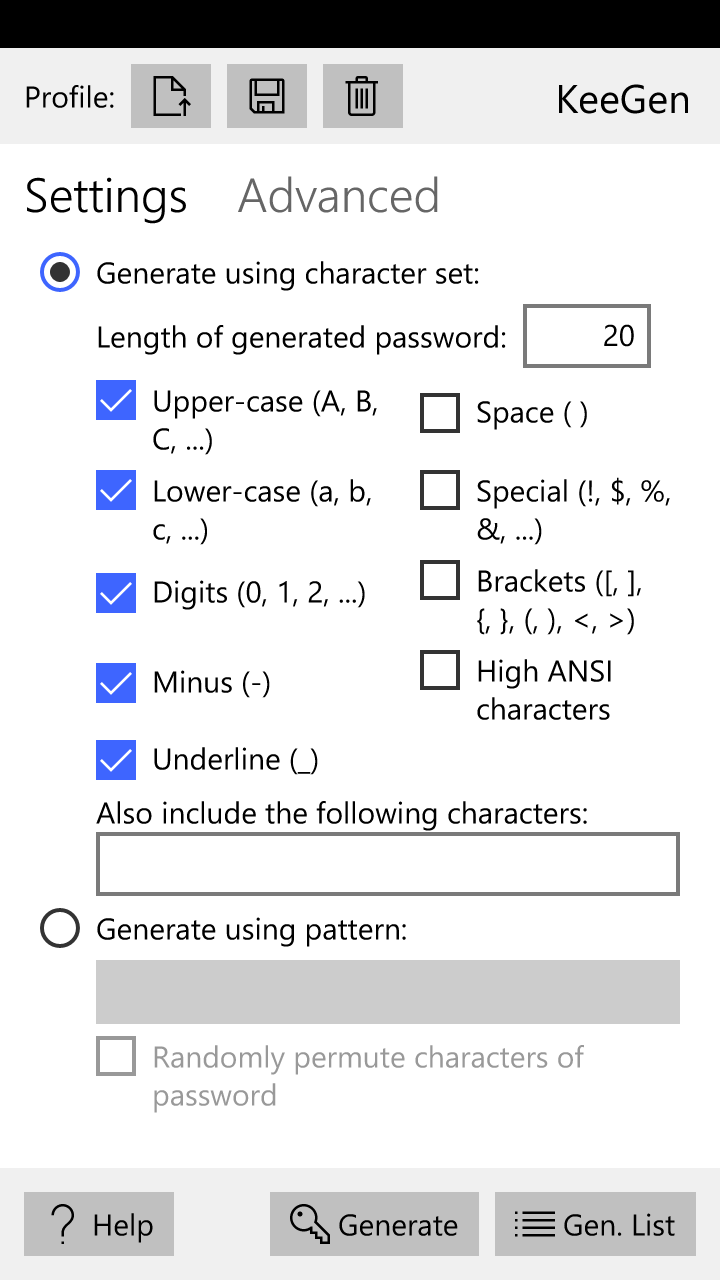
System requirements: Windows 10 or higher.KeeGen is a password generator app that supports various generation methods and options. Features:
KeeGen is available in the Windows app store: KeeGen App Store Page. Contact: You have questions, feature requests, improvement suggestions or other feedback? Please send an e-mail. |
|
VisualHash |
|---|
 Language: .
System requirements: .NET Framework 2.0 or Mono ≥ 2.6.
Language: .
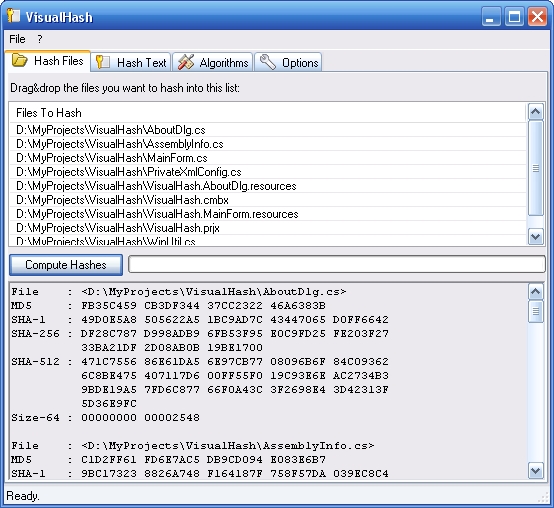
System requirements: .NET Framework 2.0 or Mono ≥ 2.6.With VisualHash you can compute hashsums of files and texts. VisualHash supports most of the common hashing and one-way algorithms, including Adler-32, Cksum-32, CRC-16, CRC-16-CCITT, CRC-16-XModem, CRC-32, CRC-32-MPEG2, CRC-64, ELF-32, FCS-16, FNV-32, FNV-64, GOST, MD2, MD4, MD5, PJW-32, SDBM-32, SHA-1, SHA-256, SHA-384, SHA-512, Sum-32, XUM-32 and many more. VisualHash is distributed under the terms of the GNU GPL. Screenshots: [Hashing Files], [Selecting Algorithms]. Latest Downloads:  Application, v1.2 (ZIP, 71 KB)
Source code, v1.2 (ZIP, 122 KB)
Application, v1.2 (ZIP, 71 KB)
Source code, v1.2 (ZIP, 122 KB)Old Downloads:
Old Windows-only application (ZIP, 140 KB, does not require the .NET Framework)
Old Windows-only source code (ZIP, 246 KB)
|
|
ReHash |
|---|
|
Language: neutral. System requirements: Windows 98 / 98SE / ME / 2000 / XP /
2003 / Vista / 7 / 8 / 10 / 11 / Unix/Linux (GCC). ReHash is an easy-to-use console-based hash calculation tool written in standard C++. It may be freely distributed and modified under the terms of the BSD open source license. The tool is compilable under Windows and Linux. It supports many algorithms, for example Adler32, CRC-16, CRC-16-CCITT, CRC-16-XMODEM, CRC-32, ELF-32, FCS-16, FCS-32, FNV-32, FNV-64, GHash-32-3, GHash-32-5, GOST-Hash, HAVAL (3/4/5, 256), MD2, MD4, MD5, SHA-1, SHA-256, SHA-384, SHA-512, Size64, Tiger, XUM32. For a full list see the ReHash documentation manual (included in downloadable package). It is possible to compute HMACs of all algorithms. The tool can output the hashes in various formats like plain text, HTML, XML and CSV. ReHash can be fully configured using some of the many command line arguments which can be passed to the tool. You can selectively activate/disable hash algorithms and set scanning options like scanning subdirectories recursively and excluding/including files using advanced file pattern matching. Links:
[ReHash Website],
[Forums]
[SourceForge.net Project Page],
[Downloads]
|
|
CSHA1 |
|---|
|
Language: neutral. System requirements: C++ compiler. CSHA1 is a C++ class implementation of the US Secure Hash Algorithm 1 as defined in the FIPS PUB 180-1 standard. SHA-1 is a very secure hash algorithm, which has been designed by the NIST along with the NSA. It produces a 160-bit hash value, and therefore is more collision-resistant and resistant against birthday-attacks than MD5 or MD2 for example. New in version 2.1:
CSHA1 class source code with demo project (ZIP, 82 KB)
Source code only (ZIP, 6 KB)Links:
CSHA1 article
|
|
BlakeSharp |
|---|
|
Language: neutral. System requirements: .NET compiler. BlakeSharp is an implementation of the BLAKE hash algorithm. See the BlakeSharp project page. |
|
CSecureEdit |
|---|
|
Language: neutral. System requirements: MFC / C++ compiler. Secure Password Edit controls are resistant to window style changers and programs that read out the text of password edits. New in version 1.3:
Demo application with source code (ZIP, 747 KB)
|
|
CSecureEditEx |
|---|
|
Language: neutral. System requirements: MFC / C++ compiler. Improved version of the CSecureEdit class, but also has some additional limitations (no selections are possible). The CSecureEditEx class is, in contrast to the lite CSecureEdit class, resistant against process memory dumpers. The entered passwords aren't visible in the process memory of the application. Downloads:
Demo project with source code (ZIP, 72 KB)
Source code only (ZIP, 18 KB)
|
|
KeeCryptLib |
|---|
|
Language: Neutral. System requirements: Windows. This library securely encrypts and decrypts files. It uses the Advanced Encryption Standard (AES) and SHA-256 algorithms. KeeCryptLib attempts to make dictionary-attacks a bit harder by encrypting the master key multiple times before using it (this adds a linear time factor). In order to generate the IVs and master seeds, it collects various more or less random things from Windows (mouse cursor position, time, memory status, etc.). KeeCryptLib is distributed under the terms of the BSD license. Feel free to use the library in your project (the API is pretty simple, have a look at it!). Download:
Source code, demos and documentation (ZIP, 155 KB)
|

